
Introduction
Do you have multiple OLM files in your system? However, you are unable to access due to compatibility issues and are looking for trustworthy approaches to Export OLM to Zoho Mail without any corruption or data loss. OLM is a default storage file of MS Outlook for Mac, which stores all the data, such as emails, contacts, calendar, tasks, and more. User can’t access on Windows or on other platforms, so migration is required. In this blog, you will find the various solutions for conversion that users find user-friendly and an attractive way of conversion. Here, you will get the answer to all your questions regarding the migration of OLM data.
Also Read: Export OLM file to Spark Mail
A Quick Overview: OLM File and Zoho Mail
OLM File
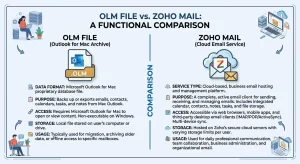
OLM (Outlook for Mac) is a proprietary data file created by Microsoft Outlook for Mac. This file contains emails, contacts, attachments, and carry mailbox data, which is mainly used for backup or migration purposes. An OLM file is only compatible with the Mac Outlook environment and is unable to access its data on Windows Outlook or cloud-based services.
Zoho Mail
Zoho Mail is a secure and reliable cloud-based email service that is widely used for personal and business communication. This provides a clean, ad-free interface, advanced security features, and IMAP/POP/ActiveSync support. Zoho Mail is unable to support OLM files directly, but it can easily be compatible with EML, PST or IMAP Migration.
What are the Major Causes of Conversion?
Some reasons why user need to convert their data
- Cross-Platform Access – The OLM file is a native file of Mac, and it only opens in Mac Outlook. If you want to open your OLM data in other email clients like Windows Outlook, Zoho Mail, and more, then conversion is necessary.
- Email Migration – When users shift from Mac to other email clients, they need to convert OLM to a compatible format, which is why conversion is needed.
- Data Backup – If you want to create a backup of your data for future accessibility, users need to convert their OLM data into another format, such as PST, MBOX, EML, and others.
- Support for Multiple Platforms – If you convert your OLM data into PST or MBOX, users can access their data in Windows, Mac, Thunderbird, Gmail, and Zoho Mail, which is why conversion is needed
- Organised Migration – For maintaining the folder hierarchy, or email structure conversion is needed.
Methods to Export OLM file to Zoho Mail
Manual Solution
This is a manual way of converting your OLM data into Zoho Mail, in which user can convert their data by the drag and drop option. But we are telling you the steps; we are not recommending it. Although the manual technique is free, it is time-consuming, and there is a danger of data loss, particularly for large mailboxes.
Step 1: Use Mac Outlook to Export OLM
- Launch Mac Outlook.
- Click on File → Export.
- Emails, contacts, and calendars are among the elements that can be exported.
- Choose an OLM file as the format.
- After choosing the Save location, finish the export.
Step 2: Convert OLM to a Compatible Format
You must first convert it to EML or PST format because Zoho Mail does not accept OLM natively.
Option A: Outlook on a Mac:
- Choose each email separately.
- Select File → Drag & Drop → Local folder they save in .eml format.
Option B: Using Windows Outlook (Extra Step).
- Import the OLM file into Outlook for Mac and then setup same account the Outlook for Windows account.
- Sync mailbox with IMAP or Exchnage
- Launch Windows Outlook and open the PST file.
Step 3: Add PST or EML files to Zoho Mail
- In Zoho Mail, set up an IMAP account by going to Settings → Mail Accounts → IMAP.
- EML files can be manually dropped, or PST data can be synced.
- Make sure that every email, attachment, and folder has been moved correctly.
The Manual Method’s Drawbacks
- Large mailboxes take a long time.
- Attachments and folder hierarchy could be lost.
- Contact and calendar migration is challenging.
Expert Solution to Export OLM file to Zoho Mail Account
Wanted to migrate OLM data systematically without struggling. Then, once apply this tool, TrustVare OLM Converter. This tool makes the transfer easier and more comfortable. Users don’t need to put extra effort into converting. The manual method is not inherently ineffective; however, it is somewhat time-consuming. It is most suitable for use when transferring a smaller volume of data. But users can transfer from this software in any situation. This application gives reliability to export OLM to Zoho Mail in bulk. This trusted application can migrate all the metadata smoothly without extra hassle, including email, folders, attachments, and more. This software offers a free demo version to the user so that users can test the functionalities of the product. The tool is available on the official website of the company.
Steps by Step to Export OLM to Zoho Mail
Download & Install the Tool
You need to begin by downloading the application on your system
Launch the software on your PC
Add OLM File
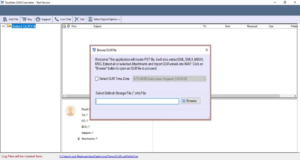
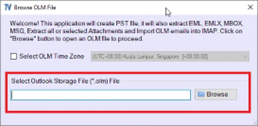
Press the browser button and select a single file or multiple folders, and add OLM data from your local storage.
Preview and Select data
Before migrating the data, take a preview or cross-verify the data that you selected.
Choose Export Format
After previewing the data, click on Select Export Option and select the Zoho Mail or IMAP option.
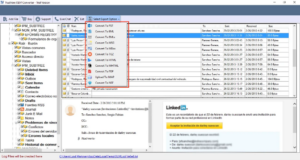
Choose location
Then, choose the destination mailbox as Zoho Mail and enter the Zoho Mail credentials.
Moreover, choose the advanced features option based on the requirement
Start Conversion
After completing all the processes, click on the Convert Button
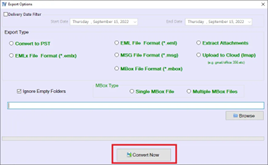
The Benefits of Exporting OLM to Zoho Mail with this Software
Direct OLM Accessibility Across Platforms
OLM file only access in Mac Outlook. However, you can transfer your OLM data in multiple formats through this application and access it on any platform, including Windows Outlook, Zoho Mail, Thunderbird, and more.
100% Data Integrity Maintain
During the conversion process, maintain the data integrity and smoothly migrate all the emails, attachments, inline images, metadata, etc., and preserve all the data without any data loss or corruption.
Bulk Conversion Capability
If you have a large number of OLM files, you can export your data in bulk with the help of this tool. This tool offers a batch conversion option.
Maintains Folder Hierarchy
This tool is an expert at maintaining the folder hierarchy, including Inbox, Sent, Drafts, custom folders, etc., in its original structure intact.
Conclusion
In the Conclusion, various solutions are discussed to export OLM to Zoho Mail, such as the manual solution and the Expert solution, both of which are reliable solutions. However, it ultimately depends on the specific situation as to which solution is most appropriate to use. When a user needs to migrate a small amount of data, the manual option is appropriate, or if users have a large amount of data, then the Expert solution is perfect. Both solutions are equally valid and effective within their respective contexts. So, users can choose this solution as per their requirement.
FAQs
What is OLM Converter?
OLM Converter is a tool that helps users migrate data to their desired format
Can the Individual Migrate Data in Batches with this Application?
Yes, an individual can migrate multiple data sets at once
Does this Software Offer a Demo Version?
This software offers a free demo version so that users can test the application.